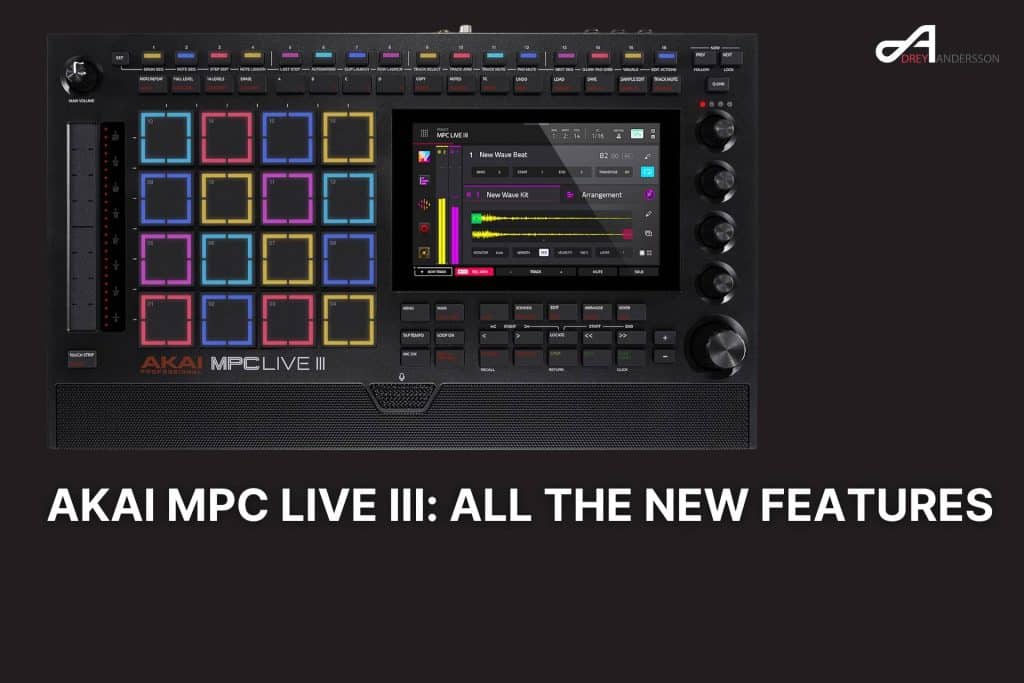
TL;DR – What’s New in the MPC Live III
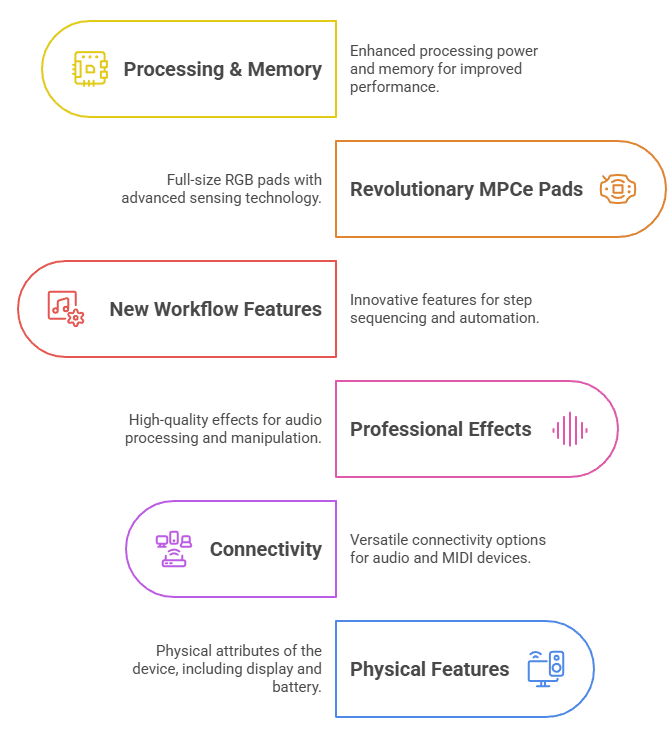
The Akai MPC Live III brings revolutionary upgrades to standalone music production:
Processing & Memory:
- 8-core processor (4 power cores, 4 efficiency cores) – 4x faster than Live II
- 8GB RAM (up from 2GB)
- 128GB internal NVME2 solid-state storage
- Support for 32 virtual instruments (up from 8)
- 16 audio channels (doubled from 8)
Revolutionary MPCe Pads:
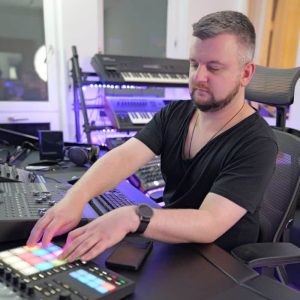
- 16 full-size RGB pads with 3D sensing technology
- X-axis, Y-axis, and pressure sensitivity on each pad
- 4 sample zones per pad (64 total zones)
- 32-slot modulation matrix per pad
- Assignable articulations (note repeat patterns) per pad corner
New Workflow Features:
- 16 RGB performance buttons for step sequencing and automation
- Clip launching matrix with row launch and follow actions
- 64 programmable Q-Link pad grid buttons (4 pages of 16)
- Customizable performance touch strip with 11 functions
- XYFX mode transforms screen into X-Y effects controller
- Built-in high-quality studio microphone
Professional Effects:
- Reverb Pro with EQ and compression
- Visual EQ with real-time analyzer
- Utility plugin for phase, stereo width, and gain
- Enhanced time stretching algorithm
Connectivity:
- USB-C class-compliant audio/MIDI interface (24 audio channels, 32 MIDI channels)
- Direct iPhone/Android sampling capability
- 8 CV/Gate outputs for modular integration
- Pro-level stem separation on hardware
- WiFi and Bluetooth with Ableton Link support
Physical Features:
- 7-inch multi-touch display
- Built-in stereo studio monitors
- 4-hour rechargeable battery
- 8.6 lbs / 3.9 kg
- 2 combo inputs with mic preamps
Bottom Line Up Front
The Akai MPC Live III represents the most significant leap forward in standalone music production technology. This production workstation delivers four times the processing power of its predecessor, combining professional-grade features like clip launching, pro-level stem separation, built-in microphone, and USB-C class-compliant audio interface capabilities into a portable, battery-powered unit designed for producers, beatmakers, and live performers who demand studio-quality results without a computer.
Introduction
The music production landscape has transformed dramatically over the past decade. Today’s producers and beatmakers need equipment that can keep pace with their creativity while offering the freedom to work anywhere. The Akai MPC Live III answers this call with groundbreaking technology that redefines what a standalone production workstation can achieve.
This comprehensive review examines every feature of the MPC Live III, from its revolutionary MPCe performance pads to its professional-grade effects and connectivity options. Whether you’re an established producer looking to upgrade your workflow or a performer seeking the ultimate portable production solution, this deep dive will help you understand why the Live III represents a new standard in music creation technology.
Revolutionary MPCe Expressive Pads: A New Dimension in Performance
3D Sensing Technology Changes Everything
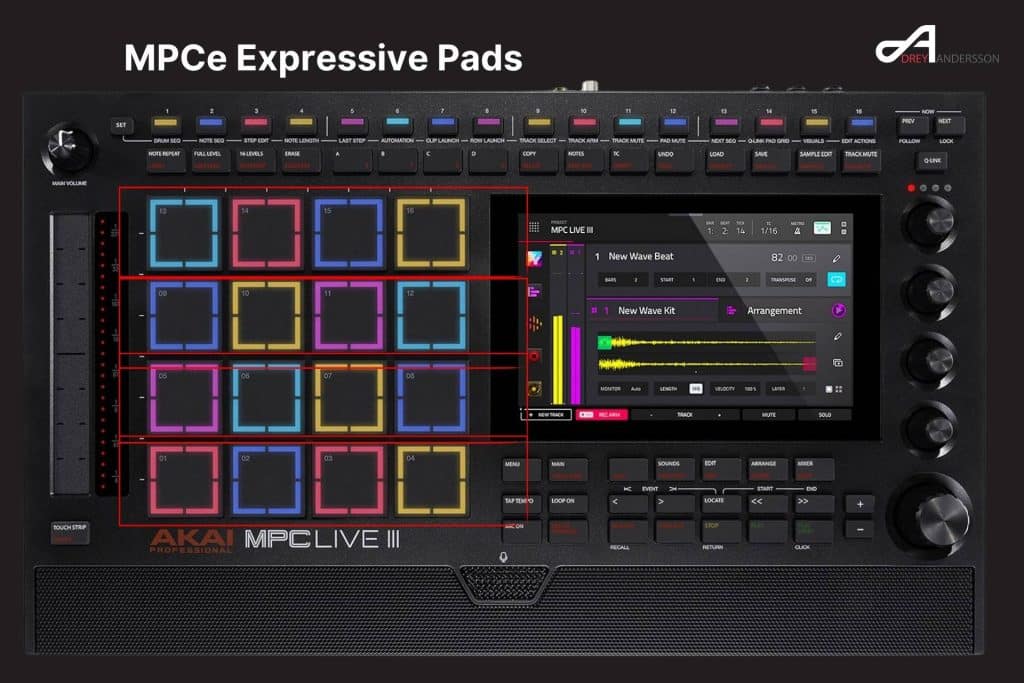
The MPC Live III debuts Akai’s state-of-the-art MPCe performance pads, which represent the most significant innovation in pad technology since the original MPC. Each of the 16 full-size RGB pads features advanced 3D sensing technology that captures X-axis, Y-axis, and pressure sensitivity simultaneously. This multi-dimensional approach to pad performance allows producers to create expressive, dynamic sounds that were previously impossible on traditional MPC hardware.
The technology behind these pads enables real-time modulation of multiple parameters through finger movement. You can swipe across a pad to morph between different sounds, increase filter cutoff frequency, or adjust LFO speeds. The pads recognize which corner you last touched, making it possible to place different samples in each of the four quadrants of a single pad, effectively transforming 16 pads into 64 distinct sample zones.
Modulation Matrix Powers Advanced Sound Design
Each MPCe pad includes a comprehensive 32-slot modulation matrix that routes multiple modulation sources to virtually any destination parameter. The pad’s X and Y axes, poly aftertouch, and internal LFOs can all serve as modulation sources. This sophisticated routing system enables complex sound design techniques like crossfading between sample layers, dynamic filter sweeps, and evolving textural changes.
The modulation possibilities extend beyond simple parameter adjustments. You can create evolving soundscapes where a single finger swipe across a pad triggers cascading changes across multiple synthesis parameters. The system records all finger movement as automation data, allowing you to edit and refine your performance after recording.
Articulations Revolutionize Drum Programming
The MPCe pads introduce a groundbreaking articulations feature that fundamentally changes drum programming workflow. You can assign specific note repeat patterns to each corner of a pad, effectively giving you instant access to hundreds of different rhythmic variations without leaving the pad layout.
The articulations library includes standard rudiments, dotted rudiments, rolls, and abstract patterns like buzz roll chromatic descents. Each articulation synchronizes to your project tempo, ensuring perfect timing regardless of speed adjustments. The ability to layer different articulations across pad corners enables complex polyrhythmic programming that would traditionally require extensive step editing.
Processing Power That Matches Your Ambition
8-Core Processor Delivers Unprecedented Performance
The MPC Live III features a next-generation 8-core processor architecture consisting of four power cores and four efficiency cores. This advanced chipset delivers four times the processing power of the MPC Live II, enabling capabilities that were previously impossible in standalone hardware.
The performance improvements are substantial and practical. Where previous MPC models supported eight virtual instruments or software plugins, the Live III handles 32 simultaneously. Audio channel count has doubled from eight to 16 channels. The increased processing headroom means you can build more complex arrangements with multiple software instruments, extensive effects chains, and real-time stem separation without encountering performance limitations.
Memory and Storage Built for Professional Production
The Live III includes 8GB of RAM, a fourfold increase from the 2GB found in the Live II. This expanded memory capacity allows you to work with larger sample libraries, load more virtual instruments simultaneously, and run more complex projects without hitting memory limitations.
Internal storage has grown to 128GB via a solid-state NVME2 drive. This high-speed storage solution ensures fast project load times and responsive sample access. The solid-state architecture eliminates the mechanical delays associated with traditional hard drives, making the entire system feel more responsive and immediate.
For users requiring additional storage, the Live III maintains compatibility with the 2.5-inch SATA drive bay for expanded storage options. Combined with SD card support and USB connectivity for external drives, the storage expansion possibilities are virtually unlimited.
16-Step Sequencer and Advanced Workflow Features
Dedicated Hardware Controls Transform Sequencing
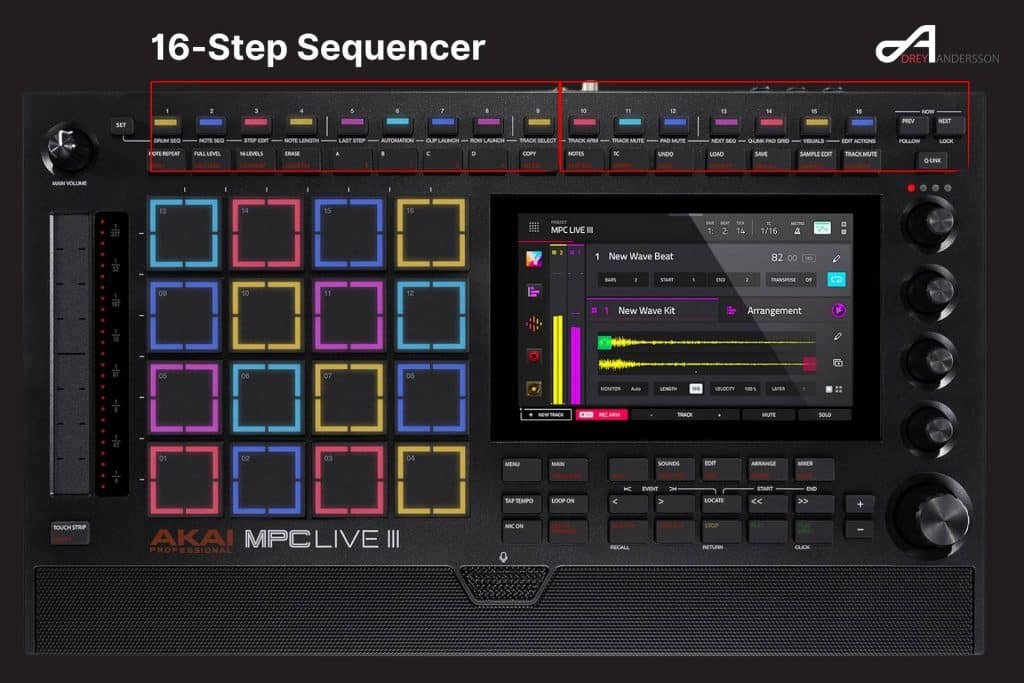
The MPC Live III introduces 16 RGB performance buttons positioned above the pads, providing dedicated hardware controls for step sequencing, automation, and performance functions. These buttons eliminate menu diving and keep your workflow hands-on and immediate.
The buttons serve multiple functions accessed through a simple press-and-hold interface. Primary modes include track selection, drum sequencing, step editing, automation, track arm, track mute, pad mute, clip launch, and row launch. This versatile button row adapts to your current task, providing exactly the controls you need at each stage of production.
Step Sequencer Workflow Accelerates Production
The drum sequencer mode enables classic MPC-style pattern programming with enhanced capabilities. The system remembers which corner of each pad you last touched, allowing you to sequence different samples from different pad quadrants directly into your pattern. This intelligent behavior streamlines drum programming and eliminates the need to constantly switch between pad banks.
The touch strip controller provides immediate access to velocity adjustment for any step. Simply press and hold a step while moving the touch strip to dial in exact velocity values. This tactile approach to velocity editing is faster and more intuitive than scrolling through menus or tapping on-screen controls.
Step Edit Mode Enables Detailed Programming
Step edit mode transforms the sequencer buttons into powerful editing tools for individual notes. You can adjust velocity, probability, nudge timing, and add ratcheting effects to create human-feeling grooves and complex rhythmic variations.
The probability parameter introduces controlled randomness into your sequences. Set a step to 50 percent probability, and it will trigger only half the time, creating evolving patterns that never repeat exactly. Nudge ticks allow you to shift notes slightly off the grid for subtle swing and groove variations.
The tune parameter enables per-step pitch adjustments, perfect for creating melodic variations in hi-hat patterns or adding subtle pitch movement to drum hits. Combined with the envelope controls for attack, decay, sustain, and release, you have comprehensive sound-shaping capabilities at the step level.
Automation Per Step Opens New Creative Possibilities
The automation mode allows you to animate any parameter of any effect on a per-step basis. This granular control enables sophisticated production techniques like reverb throws on specific steps, filter sweeps that occur only during fills, or bit-crushing effects that appear and disappear in sync with your rhythm.
The automation lanes provide visual feedback showing exactly where parameter changes occur. You can automate mix levels, effect parameters, synthesis controls, and virtually any adjustable parameter in your project. This capability brings DAW-level automation precision to standalone hardware.
Clip Launching Matrix: Live Performance Meets Studio Production
Matrix Workflow Enables Non-Linear Creativity
The MPC Live III introduces a comprehensive clip launching matrix that transforms how you approach music creation and performance. This workflow allows you to record, trigger, and arrange musical ideas in a non-linear fashion, perfect for building tracks organically or delivering dynamic live performances.
The matrix view displays all your clips in a grid layout, with tracks running vertically and clip variations running horizontally. You can trigger clips using the touchscreen or dedicated hardware buttons, making it easy to audition different musical ideas quickly and build arrangements in real-time.
Two Approaches to Clip Recording
The Live III offers two distinct methods for clip recording, each suited to different creative workflows. The main mode approach includes a plus button that duplicates your current clip while keeping overdub enabled. This feature excels at building layered arrangements, where each new clip adds elements to the previous version. Start with a kick drum pattern, duplicate to a new clip while adding a snare, then duplicate again while adding hi-hats.
The matrix view approach records each take as a unique clip, ideal for capturing different melodic ideas or improvised variations. This method works perfectly for exploring multiple options and comparing different approaches to a section.
Row Launch and Follow Actions Enable Sophisticated Performances
Row launch functionality allows you to trigger entire horizontal rows of clips simultaneously, perfect for transitioning between different sections of your arrangement. Each row can have its own unique tempo setting, enabling seamless transitions from half-time breakdowns to double-time drum and bass sections.
Follow actions automate clip transitions based on time or musical divisions. Set a clip to play for two bars before automatically jumping to the next clip in the sequence. This capability allows you to construct complete performances that execute automatically, freeing you to play instruments, adjust effects, or manipulate other performance parameters.
Record to Arrangement Captures Live Performance
The record to arrangement feature captures your clip launching performance directly to the traditional timeline view. As you trigger different clips and rows, the system records these actions in real-time, converting your live performance into an editable arrangement.
This workflow bridges the gap between live performance improvisation and traditional linear arrangement. You can perform multiple versions of your song structure, then use the loop region to select the best sections from each performance and combine them into a final arrangement using song mode.
Q-Link Pad Grid: Programmable Performance Control
64 Assignable Buttons for Ultimate Customization
The Q-Link Pad Grid transforms the MPC Live III into a fully customizable performance instrument. The 16 step sequencer buttons operate across four pages, providing 64 total assignable buttons. Each button can control any parameter in your project, with the ability to stack multiple parameter assignments on a single button.
This system enables complex performance setups where a single button press activates multiple effects across different tracks, mutes specific elements, or triggers elaborate transition effects. You might program one button to activate reverb on the master output while simultaneously enabling a band-pass filter on your melodic elements, creating instant breakdown effects.
Learn Mode Simplifies Assignment
The learn function makes assigning parameters to buttons incredibly straightforward. Activate learn mode, adjust the parameter you want to control, and the system automatically maps that parameter to your selected button. The interface supports toggle and momentary behaviors, minimum and maximum value ranges, and linear throw direction adjustments.
The visual feedback system uses color-coding to indicate button states, making it easy to track which effects and functions are active during performance. This intuitive interface ensures you always know the current state of your performance setup.
Integration with New Effects
The Q-Link Pad Grid works seamlessly with the Live III’s new professional effects, including Reverb Pro and Visual EQ. You can assign effect parameters to buttons for instant access during performance, or use the system to create complex effect chains that activate and deactivate in sync with your arrangement.
The flexibility extends to traditional MPC workflow elements like Flex Beat on the master output. Assign different Flex Beat values to different buttons for instant stuttering, half-speed, and time-manipulation effects during live performance.
Performance Touch Strip: Customizable Expression Control
11 Functions in One Versatile Controller
The Performance Touch Strip represents another significant innovation in the Live III. This single controller provides 11 different functions accessible through a simple press-and-hold menu. Functions include pitch bend, modulation wheel, sustain, expression pedal, note strumming, crossfader control, track level adjustment, pad level control, Q-Link mode, and velocity control.
The touch strip adapts to your current task, providing exactly the expression control you need. When playing melodic instruments, it functions as a traditional pitch or modulation wheel. When mixing, it becomes instant access to track or pad levels. During DJ-style performances, it operates as a smooth crossfader between different groups of tracks.
Q-Link Mode Mirrors Parameter Control
Q-Link mode deserves special attention for its workflow benefits. When activated, the touch strip mirrors whatever parameter you last touched on the screen. Touch a filter cutoff knob, and the strip becomes a large, tactile controller for that specific parameter. This feature eliminates the need for large hand movements across the interface when automating parameters, making real-time control more precise and comfortable.
The mirror functionality extends beyond simple parameter control. You can assign multiple parameters to a single screen knob through the Q-Link system, then use the touch strip to control all assigned parameters simultaneously. This capability enables sweeping changes across your entire mix with a single gesture.
XYFX Mode Transforms the Screen into a Performance Tool
The MPC Live III introduces XYFX mode, which transforms the 7-inch multi-touch screen into a powerful X-Y controller for real-time effects manipulation. This mode eliminates menu diving and provides an intuitive visual interface for controlling effects during performance and production.
Effects in XYFX mode are color-coded to differentiate between beat-synchronized and manually controlled options. This visual feedback helps you quickly identify which effects will lock to your project tempo and which provide free-form control. The flexible routing allows you to target individual tracks or stereo output pairs, enabling both surgical precision and broad-stroke effects application.
The X-Y pad interface provides simultaneous two-dimensional control over effect parameters. You might map filter cutoff to the X-axis and resonance to the Y-axis, allowing complex filter sweeps with simple gestures. The screen’s multi-touch capability means you can even control multiple effect parameters simultaneously using multiple fingers, opening up performance possibilities that would require multiple hardware controllers in traditional setups.
Professional Effects Suite
Reverb Pro Delivers Studio-Quality Ambience
The Live III includes Reverb Pro, a new professional-grade reverb effect designed specifically for the enhanced processing capabilities of the 8-core processor. This reverb provides studio-quality sound with extensive control over every aspect of the reverb character.
The main page controls basic parameters like mix level, decay time, pre-delay, and overall size. Additional pages provide detailed control over early reflections and reverb tail characteristics. The effect includes built-in EQ and compression sections, allowing you to shape the reverb sound without adding additional plugins.
The EQ section operates exclusively on the reverb signal, enabling frequency-specific reverb effects like rolling off low frequencies for cleaner mixes or emphasizing high frequencies for shimmer effects. The compression section helps control reverb dynamics, ensuring consistent ambience levels throughout your mix.
Visual EQ Provides Precision Frequency Control
Visual EQ represents a significant upgrade to the MPC platform’s mixing capabilities. This four-band parametric EQ includes a real-time analyzer showing the frequency content of your audio. The visual feedback helps you identify problem frequencies and make informed EQ decisions.
Each band provides full control over frequency, gain, and Q factor. The interface supports traditional bell curves, high-pass and low-pass filters, and shelf filters. The gain compensation control helps maintain consistent loudness while making EQ adjustments, an essential feature for objective mixing decisions.
The Q-Link integration allows you to assign multiple EQ parameters to hardware controls for tactile frequency sculpting during performance. This capability brings traditional mixing console workflow to the standalone environment.
Utility Plugin Solves Common Production Challenges
The new utility plugin addresses frequent mixing and production needs with practical tools. Phase inversion helps solve phase cancellation issues between layered sounds like kick drums and bass lines. Stereo width control allows you to adjust the stereo image of individual tracks or groups.
The mono bass frequency feature enables you to ensure low-frequency content remains centered in your mix, critical for maintaining translation across different playback systems. The gain control provides overall level adjustment while maintaining volume automation moves, perfect for bringing down an entire track without losing your automation work.
Built-In Microphone and Recording Capabilities
Studio-Quality Microphone for Instant Sampling
The MPC Live III features a built-in high-quality studio microphone positioned at an angle toward the user. This microphone provides instant access to sampling capabilities without requiring external equipment or cable connections. The angled positioning optimizes voice capture while reducing keyboard and pad noise.
The microphone excels at capturing quick ideas, sampling environmental sounds, recording foley effects, and tracking vocal sketches. The built-in nature of the microphone encourages spontaneous creativity, removing barriers between inspiration and execution.
Activation is instant through the input menu, with adjustable gain control and optional phantom power for external condenser microphones connected to the rear combo jacks. The system supports simultaneous monitoring and recording, ensuring you hear exactly what you’re capturing.
Field Recording Capabilities
The battery-powered design combined with the built-in microphone makes the Live III an exceptional field recording device. You can capture ambient sounds, natural environments, street noise, and any other sonic material for later integration into your productions.
The 128GB internal storage provides ample space for extended field recording sessions. The touchscreen interface makes it easy to organize and categorize your recordings on location, ensuring you can find specific sounds when you return to the studio.
USB-C Class-Compliant Audio and MIDI Interface
Bidirectional Audio Streaming Changes Your Workflow
The USB-C port on the MPC Live III functions as a fully class-compliant audio and MIDI interface, supporting 24 channels of audio and 32 channels of MIDI in both directions. This capability eliminates the need for separate audio interfaces and opens up new integration possibilities.
You can sample directly from your smartphone by connecting it to the USB-C port and routing audio from any app on your device into the MPC. Music streaming services, YouTube videos, and mobile instrument apps all become instant sampling sources. The demonstration in the review featured sampling from Spotify running on an iPhone, showcasing the seamless integration.
MIDI Control for Mobile and Desktop Software
The bidirectional MIDI capability enables the Live III to sequence and control software running on connected devices. You can use the MPC’s sequencer to control iOS synthesizer apps, routing the audio back into the MPC for sampling or further processing.
When connected to your computer, the 24 audio channels allow you to record your entire MPC project into your DAW with each track on a separate channel. This workflow enables you to produce and arrange within the MPC’s immediate interface, then transfer to your DAW for final mixing and mastering.
The system also supports using your computer as a sound source, with 32 virtual instruments routed back into the MPC. You sequence everything from the MPC interface, control plugin parameters through MIDI CC messages, and record the audio back into your standalone projects.
Stem Separation Technology
Pro-Level Stems Without a Computer
The MPC Live III includes professional-grade stem separation technology that runs entirely on the standalone hardware. This feature separates any audio source into individual stems for vocals, drums, bass, and other instruments. The processing uses high-quality desktop-level algorithms, delivering results that match or exceed software-based solutions.
The stem separation workflow integrates seamlessly into the sampling process. After recording or sampling audio, select the stem function, choose whether to replace the original sample or keep both versions, and the system processes the audio into separate layers. Each stem appears as a different layer within the pad, allowing you to mute, solo, or process stems independently.
Creative Applications for Stem Separation
The stem separation feature opens numerous creative possibilities. Extract vocal lines from complete songs for remixing and mashups. Isolate drum patterns from reference tracks for sound design inspiration. Remove bass frequencies from samples to prevent low-end buildup in your mix.
The integration with the Live III’s effects and processing means you can apply different effects to each stem. Add reverb exclusively to the vocal stem, compress only the drum stem, or pitch-shift the melodic elements while leaving the vocals unaffected.
Connectivity and Expansion Options
Comprehensive Input and Output Configuration
The rear panel provides professional connectivity options designed for both studio and live performance applications. Four assignable analog outputs complement the main master output, enabling multi-channel routing for external mixing, effects sends, or separate monitoring configurations.
Four MIDI ports provide two inputs and two outputs, supporting 32 channels of MIDI over traditional five-pin DIN connections. This extensive MIDI capability enables complex hardware setups with multiple synthesizers, drum machines, and other MIDI-equipped instruments.
CV/Gate Integration for Modular Systems
The Live III includes eight CV/Gate outputs distributed across four stacked TRS connections. This connectivity integrates the MPC with modular synthesis ecosystems, allowing you to use the MPC as a powerful sequencer and control source for your modular system.
The CV/Gate track type, also known as CV Playgroup in MPC3 OS, provides comprehensive routing options including four envelopes, four LFOs, a full stepper sequencer, two ramps, offset control, and clock division. A complete routing matrix with sum and multiply functions enables complex modulation patches that rival dedicated modular sequencers.
The CV Playgroup feature exclusive to MPC3 OS and the Live III brings enhanced modular integration that goes beyond simple gate and pitch output. The sophisticated modulation sources and routing capabilities make the Live III a genuine control hub for eurorack and other CV-based synthesis systems.
USB Expansion and MIDI Connectivity
Two USB-A ports support connections for hard drives, USB hubs, and MIDI controllers. The Live III supports up to 32 USB MIDI devices simultaneously, enabling massive multi-controller setups. You can assign different MIDI controllers to dedicated tracks, perfect for collaborative production sessions where multiple performers control different elements of a project.
The secure USB-C connection includes a locking screw mechanism, ensuring reliable connections during live performance situations where accidental disconnection could be catastrophic.
Super Time Stretch and New Algorithms
Advanced Time Manipulation
The Live III features a new Super Time Stretch algorithm that provides higher-quality time manipulation than previous MPC models. This technology enables dramatic tempo changes without introducing artifacts or degrading audio quality.
The algorithm works across the entire tempo range, maintaining clarity whether you’re slowing material down to half-speed for hip-hop production or accelerating samples for drum and bass breakbeats. The independent pitch and tempo controls allow you to adjust timing without affecting pitch, or change pitch without affecting tempo.
Integration with Production Workflow
The time stretch functionality integrates throughout the Live III’s workflow. Apply time stretching to individual samples, entire programs, or complete tracks. The system maintains phase coherence when time-stretching multiple elements, ensuring your mix stays tight and punchy.
The quality of the Super Time Stretch algorithm makes it practical for creative sound design applications beyond simple tempo matching. Extreme time stretching creates textural effects, while moderate stretching enables vocal tuning and rhythmic alignment.
Battery Power and Portability
Four-Hour Battery Life for Mobile Production
The internal rechargeable lithium-ion battery provides approximately four hours of operation, sufficient for most production sessions or live performances. This extended battery life combined with the unit’s 8.6-pound weight makes the Live III genuinely portable.
The ability to work anywhere without mains power encourages creative exploration in new environments. Produce beats on a train, sample sounds at the beach, or set up in a park for outdoor recording sessions. The battery-powered design removes location constraints from your creative process.
Speakers Enable Immediate Monitoring
Built-in stereo studio monitors eliminate the need for external speakers when working on battery power. These speakers provide sufficient volume and clarity for production work, making the Live III truly self-contained.
The speaker design focuses on functional monitoring rather than maximum volume output. They serve their purpose perfectly for mobile production scenarios while remaining conscious of the battery life impact of driving larger speakers.
MPC3 Software Integration
Native Instruments Partnership
The Live III runs MPC3 OS, which includes deep integration with Native Instruments software instruments and expansions. This partnership brings professional sound design tools into the standalone environment without requiring computer connectivity.
The integration includes access to Native Instruments’ acclaimed Play Series instruments, designed specifically for MPC users with intuitive interfaces and focused control sets. These instruments complement the MPC workflow while providing sounds that rival software-only solutions.
Workflow Enhancements in MPC3
MPC3 introduces significant workflow improvements including the Enhanced Main Mode, Linear Song Arrange, Studio Mixer, and Advanced Keygroups. These features streamline common production tasks and reduce the time spent navigating menus.
The Enhanced Main Mode consolidates critical information and controls into a single view, reducing the need to switch between different screens. The Linear Song Arrange provides DAW-style timeline arrangement with visual feedback and intuitive editing. The Studio Mixer brings professional mixing console workflow to the touchscreen interface.
Comparison with Previous Models
Four Times the Power of Live II
The processing power increase from the Live II to Live III represents a generational leap rather than incremental improvement. The eight-core processor compared to the Live II’s dated RK3288 SoC provides dramatically improved performance across every aspect of operation.
The RAM increase from 2GB to 8GB eliminates the memory constraints that limited project complexity on previous models. Where the Live II struggled with large sample libraries or multiple virtual instruments, the Live III handles these scenarios effortlessly.
Storage Evolution
Internal storage has grown from 16GB in the Live II to 128GB in the Live III. This eight-fold increase combined with the solid-state NVME2 drive provides both quantity and quality improvements. Project load times decrease dramatically, sample streaming performance improves, and you can carry substantially more content without relying on external storage.
Who Should Buy the MPC Live III
Professional Producers
Professional producers working primarily in standalone environments will find the Live III provides studio-grade capabilities in a portable format. The processing power supports complex arrangements with multiple virtual instruments, extensive effects chains, and pro-level mixing tools.
The clip launching matrix and performance features make the Live III equally capable as a compositional tool and a performance instrument. You can develop complete tracks from initial idea through final mixdown without ever connecting to a computer.
Live Performers
Electronic musicians and DJs delivering live performances benefit from the Live III’s extensive performance features. The Q-Link Pad Grid, clip launching matrix, and touch strip provide comprehensive real-time control over every aspect of your performance.
The battery power and built-in speakers make the Live III suitable for unpredictable performance environments where reliable power sources might not be available. The robust construction and secure connectivity ensure stability during the rigors of live performance.
Beatmakers and Hip-Hop Producers
The MPC Live III maintains the workflow and feel that made the MPC legendary in hip-hop production while adding modern capabilities. The MPCe expressive pads bring new dimensions to finger drumming and sample chopping, while the powerful processor ensures you never hit performance limitations.
The stem separation feature proves particularly valuable for hip-hop production, enabling quick extraction of a cappella vocals from commercial tracks for mashups and remixes. The built-in microphone facilitates quick vocal sketches and sampling of environmental sounds for beat construction.
Electronic Music Producers
Producers working in electronic genres benefit from the Live III’s extensive synthesis capabilities, effects processing, and modular integration. The CV/Gate outputs enable sophisticated modular system control, while the clip launching matrix supports the non-linear workflow common in electronic music production.
The Native Instruments integration provides access to professional software instruments optimized for the MPC workflow. Combined with the advanced modulation capabilities of the MPCe pads, the Live III excels at creating complex evolving sounds characteristic of modern electronic music.
Pricing and Value Proposition
The Akai MPC Live III is officially priced at $1,699 USD. This pricing positions the Live III at a $300 premium over the MPC Live II launch price while remaining significantly more affordable than flagship models like the MPC X. The price reflects the substantial technological improvements including the 8-core processor, quadrupled RAM, revolutionary MPCe pad technology, and professional effects suite.
At $1,699, the Live III represents genuine value when considering its role as a comprehensive production solution. The investment replaces separate purchases of a sampler, sequencer, audio interface, MIDI interface, synthesizer workstation, and effects processor. A comparable computer-based setup with dedicated hardware for each function would easily exceed this price point before considering ongoing software subscription costs and computer upgrade expenses.
The included software and content add substantial value beyond the hardware. The MPC3 OS integration with Native Instruments instruments and expansions, the MPCe expansion kit with demonstration programs, and the extensive effects library provide immediate creative possibilities without additional purchases. This bundled content would cost hundreds of dollars if purchased separately.
When compared to other standalone production workstations in this price range, the Live III offers processing power and feature depth that rivals much more expensive solutions. The battery-powered portability adds functionality that desktop-only alternatives cannot match regardless of price.
Potential Limitations and Considerations
Learning Curve
The extensive feature set and multiple workflow options create a learning curve for new users. The Live III provides tremendous depth and flexibility, but mastering all capabilities requires time investment. Users familiar with previous MPC models will adapt more quickly, while those new to the MPC ecosystem should expect an adjustment period.
The touchscreen interface helps flatten the learning curve by providing visual feedback and direct access to parameters. However, memorizing button combinations and workflow patterns remains essential for achieving peak creative efficiency.
Size and Weight
At 8.6 pounds, the Live III remains substantially heavier than smartphone-based or tablet-based production solutions. While genuinely portable, the weight may deter users seeking the absolute minimum gear for travel production.
The physical dimensions mean the Live III requires dedicated space in your production setup or bag. This consideration matters for producers with limited desk space or those traveling with extensive equipment complements.
Battery Life Considerations
The four-hour battery life provides sufficient runtime for most production sessions, but extended sessions or all-day performances may require access to mains power. The battery serves best as a mobility enabler rather than a complete replacement for powered operation.
Heavy processing loads reduce battery life, particularly when running multiple virtual instruments or effects simultaneously. Users should plan accordingly for situations where sustained operation is critical.
My verdict
The Akai MPC Live III achieves something remarkable in music production technology. It delivers professional studio capabilities in a portable, battery-powered format without compromising functionality or sound quality. The revolutionary MPCe expressive pads, powerful 8-core processor, comprehensive connectivity, and professional effects suite combine to create a genuinely complete production solution. At $1,699, the Live III offers exceptional value for its feature set and capabilities.
The Live III excels equally in studio production and live performance contexts. The clip launching matrix, XYFX mode, and extensive performance controls make it a dynamic instrument for electronic performances, while the detailed editing capabilities and studio effects support professional-grade production work. The ability to capture ideas instantly through the built-in microphone, sample from connected devices via USB-C, and separate stems in real-time demonstrates the forward-thinking design philosophy.
For producers and performers seeking maximum capability in a standalone format, the MPC Live III represents the current state-of-the-art. The combination of familiar MPC workflow with cutting-edge technology creates a production tool that grows with your skills while maintaining the immediate, tactile experience that made the MPC legendary.
The investment in a Live III purchases not just hardware, but entry into a comprehensive production ecosystem backed by decades of refinement and a passionate global community. The unit is currently in stock at major retailers including Sweetwater, making it readily available for producers ready to upgrade their workflow. If your workflow values immediacy, portability, and independence from computer-based production, the Akai MPC Live III deserves serious consideration as your primary production tool.
Disclaimer: More info should be soon on the official Akai Website
Disclaimer 2: The infos in this article were first leaked by Sweetwater in this Video