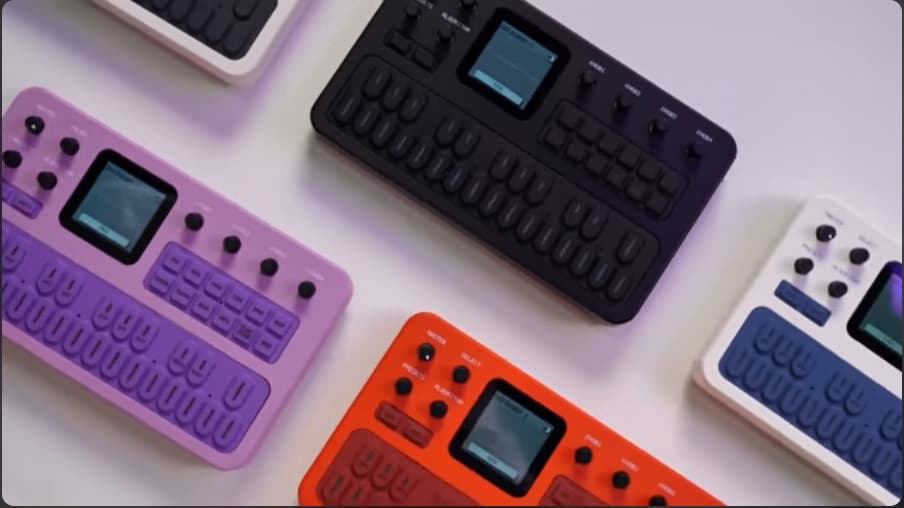
As of 6 October 2026, the M-VAVE FM-1 has seven custom firmwares you can actually install: FM-1+VA, SLOOP, Groove OS, Felucca, X0X, Jangada and OMNI. On top of those come dozens of forks (Felucca and SLOOP alone have 51), at least six of them with real changes, a patch for the stock firmware, and a handful of projects you can’t flash yet. My pick for the best FM-1 firmware for most people is Baud Girl’s FM-1+VA. It’s free, it keeps the stock FM engine, and it installs in under a minute.
The scene is ten days old and moves by the hour. Synth Anatomy counted “two new custom firmware versions (Baud Girl and Felucca) in just one week” by 4 October (Synth Anatomy, Groove OS article). By 6 October there were seven. This guide ranks every one of them, explains how to install and remove them, and tells you what to do if your FM-1 stops booting. Every version number below was checked against the developer’s own release page on 7 October 2026.
- Best overall: FM-1+VA (free). It keeps the FM engine and adds a VA engine, an 8-bit engine and a 64-step sequencer.
- Best grooveboxes: SLOOP 2.3 (free, open source) or Groove OS 1.1 ($29, the safest option).
- 27 releases shipped across four GitHub repos in about three and a half days. Re-check versions before you flash.
- Back up first. The FM-1 has one flash bank and no recovery button.
Which M-VAVE FM-1 custom firmware is best?
In my October 2026 ranking, Baud Girl’s FM-1+VA scores highest with 77 out of 100. SLOOP and Groove OS tie on 74, and Felucca follows on 73. FM-1+VA wins because it’s free, it modifies stock V15 instead of replacing it, and its own installer puts the official firmware back. Here’s the full list, with each firmware’s best use.
| # | Firmware | Best for | Version (7 Oct 2026) | Price | Score |
|---|---|---|---|---|---|
| 1 | FM-1+VA (Baud Girl) | Keeping it an FM synth, but better | FM-1_096 | Free, closed source | 77 |
| 2 | SLOOP (3dSam) | Free live-jamming groovebox | 2.3 | Free, GPL-3.0 | 74 |
| 3 | Groove OS (Peter Gombos) | Safest groovebox | 1.1 | $29 one-time | 74 |
| 4 | Felucca (Hügelton) | Sound design, 13 engines, USB audio | 1.0.3 | Free, GPL-3.0 | 73 |
| 5 | X0X (Charles Vestal) | Acid, 909, 808 and breaks | 0.10.1-beta | Free, GPL-3.0 | 71 |
| 6 | Jangada (zednaked) | Drones and dark superwaves | v0.5.1 alpha | Free, GPL-3.0 | 59 |
| 7 | OMNI (Charles Vestal) | Omnichord-style strumming | v0.1 | Free, GPL-3.0 | 54 |
How I scored them
I scored each firmware from 1 to 5 on five criteria, then weighted them. Risk to your unit counts 30%, features 25%, maturity 15%, install and rollback 15%, and cost and openness 15%. Each score is divided by 5 and multiplied by its weight, and the five results add up to the total. Ties go to the free option, which is why SLOOP sits above Groove OS. For risk, 5 means a V15 patch that can also boot stock without reflashing, 4 a V15 patch, 3 a replacement with a rescue mode and a documented hardware run, and 2 a replacement with an open boot issue, alpha status or a first release. I didn’t flash all seven onto one unit for this guide. Instead, every score comes from the developers’ documentation, release notes and issue trackers.
| Firmware | Risk (30%) | Features (25%) | Maturity (15%) | Install + rollback (15%) | Cost + openness (15%) |
|---|---|---|---|---|---|
| FM-1+VA | 4 | 4 | 3 | 5 | 3 |
| SLOOP | 3 | 4 | 3 | 4 | 5 |
| Groove OS | 5 | 4 | 3 | 4 | 1 |
| Felucca | 2 | 5 | 3 | 4 | 5 |
| X0X | 3 | 4 | 2 | 4 | 5 |
| Jangada | 2 | 4 | 1 | 3 | 5 |
| OMNI | 2 | 3 | 1 | 3 | 5 |
Why does Groove OS get a 5 for risk and Felucca a 2? Groove OS and FM-1+VA patch M-VAVE’s own V15 firmware, so M-VAVE’s code, including the stock FM engine, keeps running underneath. Felucca, SLOOP, X0X, Jangada and OMNI replace the whole application. That gives you more freedom, but it also puts more new code between you and a working synth.
What is FM-1 custom firmware, and why did it appear so fast?
FM-1 custom firmware is third-party software that replaces or patches the official M-VAVE operating system on the $60 to $80 pocket FM synth. It appeared fast because the FM-1 accepts updates as USB-MIDI SysEx checked only by a CRC-16 checksum, with no cryptographic signature (ip2k, Lunar Modulator docs). The only version check sits in the updater app, not in the synth, so a file with a new version number installs. Until late September 2026, the only M-VAVE FM-1 firmware was M-VAVE’s own.
Underneath, the FM-1 runs a JieLi AC791N chip with 1 MB of flash. Its stock sound engine is a port of Google’s msfa, the same core that powers Dexed (AL-255, FM-1-RE). So developers who already knew Dexed could read it. M-VAVE’s specs list 6 operators, 32 algorithms, 128 presets and up to 12 voices (M-VAVE FM-1 product page). If you’re new to the method itself, my Yamaha SY77 entry covers how a six-operator FM engine builds a sound.
From zero to seven firmwares in ten days
- 26 September: Baud Girl publishes FM-1_083, the first public FM-1+VA build.
- 27 September: czietz releases a small binary patch for stock V15.
- 28 September: Synth Anatomy and Piano & Synth cover FM-1+VA. It’s the earliest press coverage I found.
- 2 to 3 October: Felucca appears, and its source goes public with 0.8-beta.
- 4 October: SLOOP 2.0, X0X 0.1-beta and Jangada 0.1-alpha ship. Synth Anatomy announces Groove OS.
- 5 October: Felucca 1.0 lands with 13 engines.
- 6 October: SLOOP 2.3, X0X 0.10.1-beta, FM-1+VA 096, Felucca 1.0.3, Jangada 0.5 and OMNI 0.1 all ship on the same day.
Search demand followed the code. In my Google Trends pull, worldwide interest in “fm-1 firmware” climbed from almost nothing on 25 September to 45% of the FM-1’s own peak on 5 October. People now search for the firmware nearly half as often as for the synth itself.
The 7 installable FM-1 custom firmwares, ranked
All seven install from a Chrome or Edge browser over USB, and all seven expect stock V15 on the unit first. As of 6 October 2026, one is a free mod of M-VAVE’s own code (FM-1+VA), one is a $29 paid mod (Groove OS), and five are free, open-source replacements under GPL-3.0. Here’s what each one does, who it’s for, and its known issues.
1. FM-1+VA by Baud Girl: best overall
FM-1+VA keeps the FM-1 an FM synth and fixes what’s annoying about it. Baud Girl is Madeline’s workshop label, and she builds on the stock engine instead of throwing it away. On top of it she adds a virtual analog engine with BLEP oscillators and a ZDF filter (LP12, LP24, BP and HP). Its Super mode stacks seven detuned oscillators, much like a classic supersaw.
FM-1_096, released 6 October 2026, added a third engine: 8-Bit, with 15 waves, a duty sequence and 31 arpeggio shapes (Baud Girl release notes). Patterns now run up to 64 steps, against 16 on stock. You also get real-time recording, tie and slide, per-step ratchets and chance, a Bitcrush effect, knob banks and a browser Device Manager. Hold SEL and turn a knob, and you can reassign any of the four knobs on any screen.
FM-1+VA even fixed a stock bug. In FM-1_093, Baud Girl found that the operator mutes were swapped (OP1 silenced OP6), in M-VAVE’s firmware as well as hers.
- Best for: anyone who bought the FM-1 for FM and wants more of it.
- Price: free, with tips through Ko-fi. Closed source. The open-source plan was reported by the press on 28 September, but baudgirl.com doesn’t state it today.
- Install: baudgirl.com/work/FM-1+VA/install, Chrome or Edge, “under a minute”. It refuses files whose boot region doesn’t match M-VAVE’s, which is a good safety check.
- Rollback: load M-VAVE’s
FM-1.fwscon the same page. - Watch out: on FM-1_093 or older, M-UPGRADE shows “Checksum error” and can’t find the FM-1. Update to FM-1_094 or newer before you try M-UPGRADE. The VA preset pack overwrites presets 113 to 128, and the 8-Bit pack overwrites 97 to 112. With a filter on, an FM preset plays 9 to 12 notes, and VA with Tri or Square plays up to 8. Baud Girl also says she hasn’t tested what happens if an install stops halfway.
2. SLOOP by 3dSam: best free groovebox
SLOOP turns the FM-1 into a four-part groovebox built for playing live. You get three synth parts and a drum machine, with 16 sounds on the white keys. Hold a key, and the keys and knobs switch jobs: FX, EDIT, ARP, SEQ, SCL, GLO or SAVE. Recording follows your playing with no click required.
SLOOP 2.3 shipped on 6 October 2026 with 68 sounds (including a sampled Steinway grand), 37 drum kits, 16 punch-in effects and 9 engines inherited from Felucca 0.9 (SLOOP on GitHub). You also get MPC-style swing from 50 to 75%, 64 steps per track and three user sample slots of about 7.4 seconds each. Version 2.3 added USB audio, TRS MIDI in and MIDI clock in. With 206 GitHub stars, it’s the second most-starred FM-1 project.
- Best for: jamming loops without a computer, for free.
- Price: free, GPL-3.0-only.
- Install: isod89.github.io/sloop-fm1. If an install gets interrupted, press Install again and it finishes.
- Safety nets: hold OCT- while switching on for SLOOP USB RESCUE. The loader also refuses a flash chip it doesn’t recognise.
- Rollback: the 2.3 installer can put V15 back, or use M-UPGRADE.
- Watch out: it’s still labelled beta. 3dSam teased SLOOP 2.4 on 6 October.
3. Groove OS by Peter Gombos: safest groovebox
Groove OS is the only paid option, and it’s the most careful one. Gombos calls it “a mod of M-VAVE’s V15 firmware, not a replacement” (groove-os.com). So the stock FM engine, MIDI, Bluetooth and updater stay M-VAVE’s. Hold OCT- and OCT+ at power-on and you get the stock FM-1 back until the next restart. None of the others documents a way to start the stock FM-1 without reflashing.
Groove OS gives you eight tracks, and each loops its own length of 1 to 8 bars. You get 64 steps with up to 4 notes per step, plus a PERFORM page with 8 mutes, 11 scenes, 8 punch-ins and 4 throws. As of version 1.1, groove-os.com lists 179 sounds (242 with the included pack) and up to 20 notes at once, 12 FM plus 8 VA. It also patches three stock faults: detune that’s too wide, fast LFOs that run too slow, and a note that hangs after a velocity-0 note-on.
- Best for: people who want a groovebox and the lowest risk to the FM sound.
- Price: $29 once through Stripe, with every 1.x update included. Proprietary.
- Install: groove-os.com/install, which opens once you’ve bought it, about 2 minutes, with a SHA-256-checked download. Try it first in the browser emulator.
- Rollback: the same page reinstalls V15, but it erases your Groove projects. Export them as .groove files first.
- Note: Groove OS says it has two engines, FM and VA, plus drum kits. Synth Anatomy’s write-up counted four.
4. Felucca by Hügelton: best for sound design
Felucca is the engine room of the whole scene. Leo Kuroshita’s firmware replaces the stock app with a four-track, multi-engine synth. Most open-source FM-1 firmwares grew out of its code. It’s also the most-starred FM-1 project on GitHub, with 275 stars on 6 October 2026.
Felucca 1.0.3 has 13 engines: ANALOG, FM6, PHASE, LOFI, SAMPLE, VOICE, TRIO, WHEEL, GRAIN, PHYS, NOISE, SLICE and DRUM (Felucca on GitHub). FM6 is a six-operator, Dexed-based engine with 32 algorithms. GRAIN brings granular synthesis to a pocket synth that costs $60 to $80. Each track also gets a four-slot modulation matrix, and the four tracks share 8 voices.
The DAW tools are the best here. Felucca shows up as a driverless 44.1 kHz stereo USB audio input, takes MIDI over USB and TRS, and syncs to internal, USB or TRS clock. Its web editor has a six-operator patch editor, sample upload, full backup and restore, and a “Return to official V15” button.
- Best for: sound designers and anyone who wants to record the FM-1 straight into a DAW.
- Price: free, GPL-3.0-only.
- Install: hugelton.github.io/Felucca or
tools/fm1_install.py. - Rollback: “Return to official V15” in the web editor, or M-UPGRADE.
- Watch out: issue #61 is still open. A unit updated from 0.9-beta to 1.0.1 got stuck on a black screen in boot mode. The reporter traced it to leftover 0.9-beta data in flash, not a bad write. If you’re coming from 0.9-beta, back up and read that issue first. On macOS 13 to 15, USB audio needs MENU, USB SERIAL set to OFF.
Synth Anatomy’s first Felucca write-up warned plainly: “It can brick the hardware.” (Synth Anatomy). That warning covers every replacement firmware on this list, not just Felucca.
5. X0X by Charles Vestal: best for acid and techno
X0X is ReBirth in your pocket. It packs a 909, an 808, two 303s (each with its own TB-3PO line generator) and a breakbeat generator. On 4 October, the first two betas hadn’t run on a real FM-1. By 6 October it had reached 0.10.1-beta, its eleventh release in about 43 hours (X0X on GitHub).
The 909 comes from 9W9, with samples from ER-99. The 808 comes from 8W8, and the 303s use Open303 with Devilfish-style ranges. You get 16 patterns per part, song mode, recorded knob moves, reverb and tape-delay sends, and a bus compressor with kick pump. Version 0.9 added USB audio and DAW clock, and 0.10 added stereo pan, ping-pong delay and TRS MIDI in. Breaks don’t ship with it, so you upload your own. If you’re mixing the results, my guide on how to mix 808s applies directly.
- Best for: acid, techno and big beat.
- Price: free, GPL-3.0-only.
- Install: charlesvestal.github.io/fm1-x0x/install, or try the browser emulator first.
- Rollback: “Back to the stock firmware” at the bottom of the web installer, or M-UPGRADE.
- Watch out: a brightness setting in 0.7 to 0.9-beta could freeze the FM-1. Version 0.10 removed it, and installing 0.10 unsticks a frozen unit. So install 0.10 or newer. After two failed starts, X0X boots into a safe mode. The project’s own pre-hardware estimate put the worst-case CPU load around 103%, so heavy patterns may trigger its overload guard.
6. Jangada by zednaked: best for drones
Jangada is a darker Felucca fork from Brazil. Thiago Gonçalves gives it ten engines, including six-operator FM. On top of that come a superwave mode stacking up to six detuned copies of the oscillator and a four-slot mod matrix. Version 0.5, released 6 October 2026, added evolving drones that keep going after you let go, and 0.5.1 followed the same night (Jangada on GitHub).
Eight voices of SUPER SAW use 55% of the FM-1’s CPU, according to the README. You also get 20 new presets, five drum kits of its own on top of SLOOP’s 37, USB audio, and DX7 SysEx editing over USB in 0.5.
- Best for: ambient, industrial and drone players.
- Price: free, GPL-3.0-only.
- Install: zednaked.github.io/jangada. Felucca’s installer no longer finds a unit running Jangada, so use this one.
- Safety net: hold OCT- at power-on, or fail two boots, for JANGADA USB RESCUE.
- Rollback: the web installer (it backs up first),
./instalar-linux.sh --original, or M-UPGRADE. - Watch out: it’s still alpha. Every release so far is marked pre-release.
7. OMNI by Charles Vestal: newest, an Omnichord on the FM-1
OMNI is the newest firmware on this list, and the most playful. Charles Vestal released v0.1 on 6 October 2026 (OMNI on GitHub). The white keys become a strum plate and the black keys become chord buttons, with the OM-84’s ten rhythms. It’s built on the Felucca platform by way of X0X, and it has its own web installer and browser emulator. It’s free and GPL-3.0-only. Treat it as a first release: try the emulator before you flash it.
The FM-1 firmware family tree
Almost every open-source FM-1 firmware traces back to Felucca. As of 6 October 2026, Felucca and SLOOP alone have 51 direct GitHub forks, all created within four days. The closed-source options take the other path and hook into M-VAVE’s V15 instead. Knowing which family a firmware belongs to tells you how risky it is and how you’ll get back to stock.
FM-1 forks and patches worth knowing
Below the main seven sits a second tier of forks. As of 6 October 2026, at least six of them add something real. One is the smallest mod of all: czietz’s patch changes four things in stock V15 and leaves the rest alone. Most of these forks have no GitHub releases and few or no stars yet, so treat them as experiments.
| Fork or patch | Based on | What it adds | Version | Licence |
|---|---|---|---|---|
| Melodee (Kerem Kilic) | Felucca 1.0 | 11 engines, up to 16 FM6 voices, eight 64-step banks per track, USB audio that records four separate mono tracks | 0.11.1 | GPL-3.0 |
| sloopDX (Sven Trogus) | SLOOP | One engine only: a ported DX7 core, plus FM drums and 256 user voices | 1.9 beta | GPL-3.0 |
| SLOOP ALG (shaw-core) | SLOOP 2.2 | 16 engines incl. VA, Karplus-Strong, pluck, additive, an approximate DX7 (2 voices per track) | ALG-04 test | No licence file |
| Felucca [Salt] (Chance Roth) | Felucca 0.9 | TRS sustain, bend and mod, clock with Start/Stop/Continue, 20 palettes, browser Studio | 0.9-salt14 beta | GPL-3.0 |
| Visual FM / Floyd (renebohne) | SLOOP | Operator strips and envelope heatmaps for the 4-op engine, key LEDs, then a “Floyd” 4-op FM engine | 2.2-visual-fm, own 2.4 | GPL-3.0 |
| Felucca S49 Edition (1bitfromdend) | Felucca 1.0.2 | Remote control from an NI Kontrol S49 MK3. You build the file yourself with GitHub Actions | No release | No licence file |
| fm1-firmware-patcher (czietz) | Stock V15 | Dexed-accurate detune, ignores aftertouch vibrato, blue scope, green FX cursor | Sept 2026 | Unlicense |
Three of these deserve a closer look. Melodee is the pick if you want to record four separate tracks into your DAW over USB. sloopDX “turns the FM-1 into what it says on the box”, as Trogus puts it, but none of its SLOOP 2.3 features had been tried on a device when I checked. czietz’s patcher is for people who only want stock fixed. Its author considers the changes “quite low risk”. There’s a catch, though: M-UPGRADE treats patched V15 as identical to stock, so you have to downgrade to V14 first.
You may also find repos named Felucca or SLOOP that are plain copies. christiangmoore4/Felucca and majnikool/sloop-fm1 add nothing, so skip them.
Which FM-1 firmwares can’t you install yet?
Several of the most ambitious FM-1 projects aren’t flashable at all. The best known is ip2k’s Lunar Modulator, with 44 GitHub stars. Its README lists 13 engines and 22 effects, yet it states plainly: “This project has never written anything to an FM-1.” (Lunar Modulator). It runs in a browser simulator only. Synthtopia’s 4 October description of five engines and four effects is already out of date.
- B-Boy Edition / Pocket Sampler: a 90s-style chop sampler with up to 24 chops per track. It’s at v0.8.0 as a desktop simulator and is “not flashable FM-1 firmware” until recovery is proven.
- ChoralRoot FM-1: an Orchid-style chord instrument on Felucca, still in development.
- SLICE64-FM: a four-track SID, FM and sampler tracker. Only its web editor is public so far.
- fm1-doom and fm1-nes (Keitark): a Doom port that isn’t approved for installation yet, and an NES-player developer kit. They’re fun, but they aren’t instruments.
27 FM-1 firmware releases in three and a half days
The pace is extreme. Between 3 and 6 October 2026, Felucca, SLOOP, X0X and Jangada shipped 27 GitHub releases in three days and eleven hours. X0X alone released every 3.3 hours on median. So any version number you read, including mine, may be stale by tonight.
Community attention is just as lopsided. Two projects hold most of the GitHub stars. The FM-1 subreddit, r/MVaveFM1, ran at about 31 posts a day from 3 to 6 October, and at least four threads in two days were about bricked units.
How do you install custom firmware on the M-VAVE FM-1?
Every FM-1 custom firmware installs the same basic way: a Chrome or Edge browser, a USB data cable and a web installer page. Baud Girl’s installer finishes in under a minute, and Groove OS’s in about 2 minutes. Before any of that, your FM-1 has to run the official M-VAVE FM-1 firmware V15, released on 30 July 2026.
- Back up anything you care about. Use the firmware’s own backup tool: Felucca’s web editor, Groove OS’s .groove export, or SLOOP 2.3’s backup.
- Update to stock V15 first. Download M-UPGRADE for Windows or macOS and the
FM-1.fwscfile from M-VAVE’s download page. On the unit, V15 reports itself as FM-1_015. - Charge the battery. A unit that powers off mid-flash is the worst case.
- Use a real data cable, plugged straight in. Skip hubs. Close any other app that might hold the FM-1’s MIDI port, such as a DAW or another browser tab.
- Open the installer in Chrome or Edge. Safari has no Web MIDI, and Baud Girl’s page only supports Chrome and Edge.
- Install, then wait. Don’t unplug until the page says it’s done.
Do you have to use a browser? No. Felucca, SLOOP, X0X and sloopDX also install from a terminal with fm1_install.py, which needs the Python packages mido and python-rtmidi. If you want to hear a firmware first, the browser emulators for Groove OS, X0X and OMNI, plus a community SLOOP emulator, cost nothing and risk nothing.
How do you go back to the stock FM-1 firmware?
Six of the seven installable FM-1 firmwares document a way back to M-VAVE’s V15, and each one does it differently. The key rule from the community’s firmware-switching guide is to treat stock V15 as the middle point between replacement firmwares (Benny Sparra, switching firmware guide). Going Felucca to stock to SLOOP is safer than jumping between them directly. That guide was written for Felucca 0.9-beta and SLOOP 2.2, so check each firmware’s current notes too.
| Firmware | How to return to stock V15 | Back up first |
|---|---|---|
| FM-1+VA | Install M-VAVE’s FM-1.fwsc from Baud Girl’s install page | Nothing required. VA and 8-Bit presets won’t play on stock |
| Groove OS | Same install page reinstalls V15. Or hold OCT- and OCT+ at power-on for a temporary stock boot | Export projects as .groove files. They’re erased |
| Felucca | “Return to official V15” in the web editor, or M-UPGRADE | Full backup in the web editor |
| SLOOP | 2.3 installer puts V15 back, or M-UPGRADE | Backup in the 2.3 installer |
| X0X | Web installer restores V15. On a Mac, tools/fm1_rescue.sh | Anything you want to keep |
| Jangada | Web installer, ./instalar-linux.sh –original, or M-UPGRADE | The web installer backs up first |
| OMNI | Not documented yet for v0.1. M-UPGRADE with V15 is the usual route for Felucca-based firmware | Anything you want to keep |
| czietz patch | Downgrade to V14, then install stock V15 with M-UPGRADE | Nothing |
One trap catches FM-1+VA users. Up to FM-1_093, M-UPGRADE fails with “Checksum error” and can’t see the unit. So update to FM-1_094 or newer, or use Baud Girl’s own page to go back.
Is FM-1 custom firmware safe?
It’s a calculated risk, and the hardware leaves no margin for error. The FM-1 has a single application flash bank, no test pads and no recovery button (ip2k hardware notes). AL-255, who reverse-engineered the update protocol, puts it bluntly: “The update protocol is not a demonstrated recovery mechanism.” (AL-255).
Real problems have happened, though fewer than the forum noise suggests. Felucca issue #61, the black screen after an update from 0.9-beta, is real and still open. X0X’s brightness freeze was real and is fixed. Two well-known “rollback doesn’t work” reports, Felucca #32 and SLOOP #8, were closed the same day after the reporter blamed their own computer: a MIDI port held open by another app, or a Mozilla browser. Felucca #63, about parameters moving on their own, turned out to be recorded knob motion.
There’s also the question of how this code was written. Piano & Synth’s Andy Merrett notes that “the majority, if not all, of these firmware updates have used AI at least partially” (Piano & Synth, 5 October 2026). Synth Anatomy called it “the wave of vibe-coded custom firmwares” (Synth Anatomy, SLOOP article). That says nothing about quality on its own. It does mean none of this code has had months of real-world use yet.
So here’s the practical rule. Every flash writes the same single bank, so every install carries the same write risk. What the V15 patches lower is the risk of a firmware that won’t start afterwards, because M-VAVE’s own code keeps running underneath. If you don’t want to build a recovery tool, stay with FM-1+VA or Groove OS. czietz’s patch is small, but it needs two flashes because of the V14 detour.
What if your FM-1 won’t boot after a firmware update?
Work through the recovery steps from cheapest to most drastic. Hardware recovery is a last resort: the FM-1 Transporter reads the full 1 MiB flash in about 3 seconds, but you have to build it yourself (FM-1 Transporter).
- Use the firmware’s own rescue mode. Hold OCT- at power-on for SLOOP, sloopDX and Jangada. Hold OCT- and OCT+ for Groove OS’s safe mode. X0X and Jangada also enter safe or rescue mode by themselves after two failed boots.
- Run the installer again. SLOOP finishes an interrupted install when you press Install again. Try a different cable and USB port, and restart the computer to free a stuck MIDI port. If your computer lists the FM-1’s MIDI port under a different name, the community tool fm-static can still find it.
- Black screen and “UBOOT1.00” over USB? The unit is sitting in the chip’s own download mode. The Felucca #61 reporter restored their unit over a plain USB cable with jl-uboot-tool and wrote it up as a community guide on r/MVaveFM1 (6 October 2026). That’s one user’s report, not developer documentation, so follow it carefully.
- Hardware recovery. The FM-1 Transporter is a Seeed XIAO RP2040 wired to the FM-1’s USB lines with three wires: D+, D- and ground. Its README says “Do not connect VBUS.” It needs a Mac host, a self-built firmware and a loader file that isn’t included. czietz has also published a Raspberry Pi Pico dongle that reaches the same mode.
One warning about sending raw SysEx to your unit. On stock V15, the message F0 22 24 35 7D F7 reportedly drops the FM-1 into that download mode. The normal upgrade command, F0 22 24 35 7F F7, differs by one byte. Don’t type either by hand unless a recovery guide tells you to.
Which FM-1 firmware should you install?
For most people, my recommendation is FM-1+VA. It scored 77 of 100, it’s free, and it keeps M-VAVE’s FM engine running underneath. It also has the easiest way back to stock of any free option. If you already know what you want the FM-1 to become, pick by job instead:
- “I want a better DX7 in my pocket”: FM-1+VA. For the lightest touch, czietz’s patch.
- “I want a groovebox and I’m careful”: Groove OS, $29. Its boot-to-stock key combo is the best safety net here.
- “I want a groovebox for free”: SLOOP 2.3. Missing six-operator FM there? Try sloopDX.
- “I want to design sounds and record into my DAW”: Felucca 1.0.3. For four separate USB tracks, Melodee 0.11.1.
- “I make acid and techno”: X0X, version 0.10 or newer.
- “I make drones”: Jangada, if you’re fine with alpha software.
- “I just want to try one”: open the Groove OS or X0X browser emulator before you flash anything.
Whatever you pick, the FM-1 is a $60 to $80 synth, not a studio centerpiece. It’s a fine one to experiment on. My analog vs digital synthesizers guide explains why a cheap digital box can turn into so many different instruments.
Frequently asked questions
What is the best custom firmware for the M-VAVE FM-1?
FM-1+VA by Baud Girl is the best all-round choice in October 2026, scoring 77 out of 100 in my ranking. It’s free, it keeps the stock FM engine, and it adds a VA engine, an 8-bit engine and a 64-step sequencer. For a groovebox, choose SLOOP (free) or Groove OS ($29).
Can custom firmware brick the M-VAVE FM-1?
Yes, it can. The FM-1 has one flash bank and no recovery button, and the FM-1 subreddit saw at least four bricking threads in two days in October 2026. The documented ways back are the firmware’s own rescue mode, a reinstall, or the chip’s USB download mode. Hardware recovery needs a self-built RP2040 tool.
Do I need stock V15 before installing FM-1 custom firmware?
Yes. FM-1+VA, Groove OS and the open-source installers all expect M-VAVE’s stock V15, released on 30 July 2026. If your FM-1 runs an older version, update it with M-VAVE’s M-UPGRADE tool first. On the unit, V15 identifies itself as FM-1_015.
How do I put the original M-VAVE firmware back on my FM-1?
Download M-VAVE’s FM-1.fwsc file and install it through the same page you used for the custom firmware, or with M-UPGRADE. Groove OS erases its projects when you return to stock, so export them first. On FM-1+VA 093 or older, update to 094 before using M-UPGRADE.
Is M-VAVE FM-1 custom firmware free?
Almost all of it is free. Of the seven installable firmwares in October 2026, six cost nothing: FM-1+VA, SLOOP, Felucca, X0X, Jangada and OMNI. Five of those are open source under GPL-3.0. Groove OS is the exception, a one-time $29 purchase that includes every 1.x update.
Which FM-1 firmware lets me record audio over USB?
Felucca, SLOOP 2.3, X0X 0.9 and newer, Jangada and Melodee all show up as a USB audio input at 44.1 kHz. Felucca and Melodee state that no driver is needed. Melodee is the only one that records four separate mono tracks. On macOS 13 to 15, Felucca’s USB audio needs USB SERIAL set to OFF.
Sources
Every source below was retrieved on 6 October 2026, and all version numbers were re-checked on 7 October 2026. GitHub stars and release counts are a snapshot from about 19:00 UTC on 6 October.
- M-VAVE, FM-1 product page and downloads and release notes
- Baud Girl, FM-1+VA and install page with release notes
- Peter Gombos, Groove OS and manual
- Hügelton Instruments, Felucca repository, releases and issue #61
- 3dSam, SLOOP repository and releases
- Charles Vestal, X0X and OMNI repositories
- zednaked, Jangada repository
- ip2k, Lunar Modulator documentation (hardware, update protocol, recovery)
- AL-255, FM-1-RE reverse-engineering notes
- kurogedelic, FM-1 Transporter
- Synth Anatomy, Baud Girl FM-1+VA (28 Sep 2026), Groove OS (4 Oct 2026), 3dSam SLOOP (4 Oct 2026)
- Piano & Synth, M-VAVE FM-1: custom firmware collection (5 Oct 2026)
- Sonic State, Free Custom Firmware for Mvave FM-1 (29 Sep 2026)
- Synthtopia, Alt Firmware Options For The M-Wave FM-1 Pocket Synthesizer (4 Oct 2026)
- Google Trends via DataForSEO (search interest) and the GitHub REST API (releases, stars), both pulled 6 October 2026